Elden Ring GPU Benchmarks: RTX 50 Series Tested
More than a year after its launch, Elden Ring: Shadow of the Erdtree is still one of the most talked-about DLCs in modern gaming. In this hands-on benchmark, we look at how NVIDIA’s RTX 50-series cards handle this demanding expansion and why, for most resolutions, “no pressure” is a fair description.
Quick Summary
If you only have a few minutes, here is the bottom line of our Elden Ring: Shadow of the Erdtree GPU test:
- The DLC is still demanding: Even a year after release, Shadow of the Erdtree remains a heavy load at max settings, especially at 4K with ray tracing enabled.
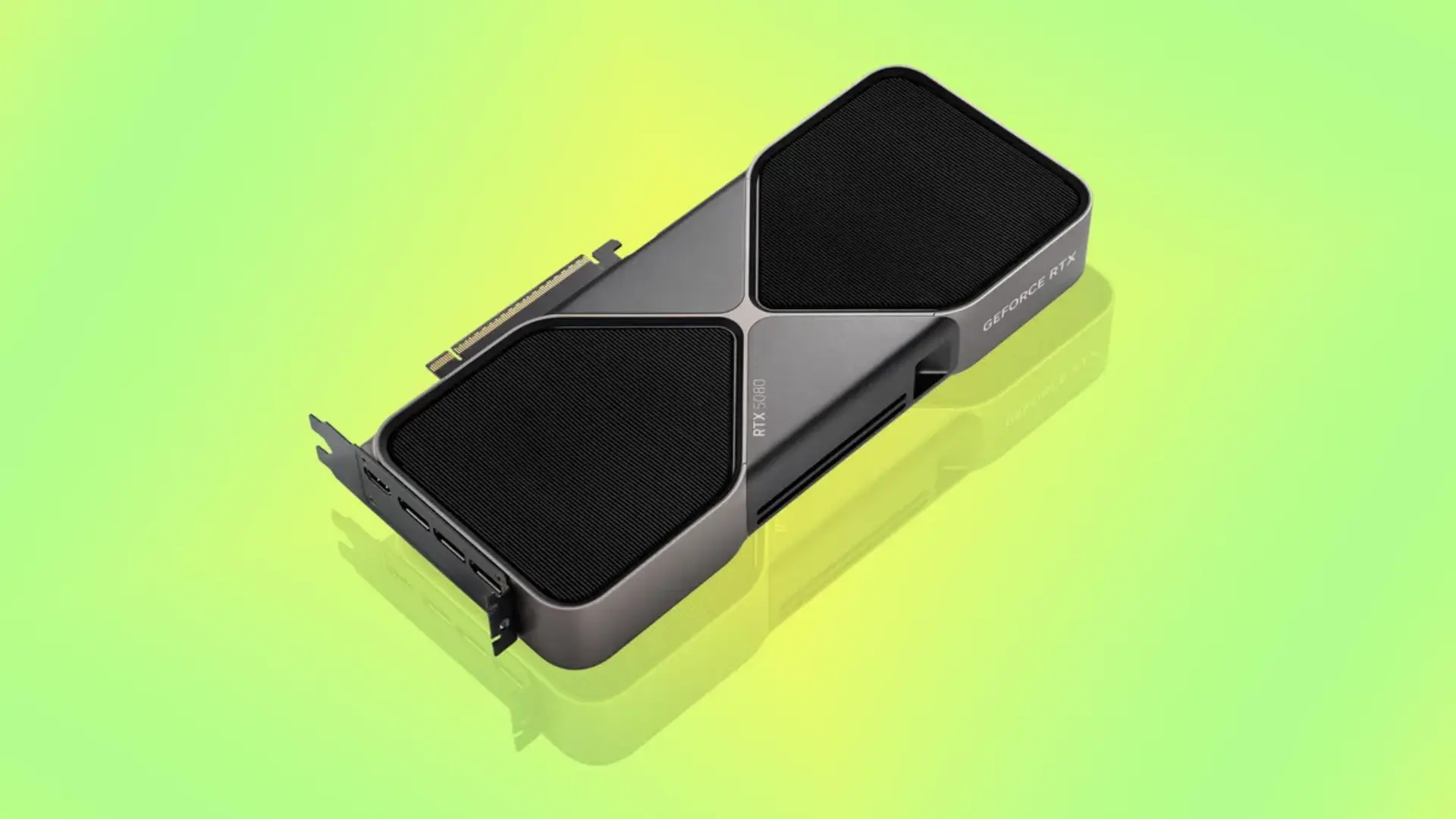
- RTX 50-series dominates: High-end GPUs like the RTX 5090 D v2 and RTX 5080 easily push past 100 FPS at 4K in our test scene, and even the RTX 5070 Ti holds comfortably playable frame rates with ray tracing on.
- Mid-range cards are fine with the right settings: RTX 5060 Ti and RTX 5060 can feel “borderline” at 4K with ray tracing, but once you dial ray tracing down or off, they land around the 60 FPS range that still defines “smooth” for this game.
- 1440p is the sweet spot: At 2K (1440p), every RTX 50-series card we tested can “no-sweat” the DLC, with even the RTX 5060 hitting roughly mid-60s FPS with ray tracing fully enabled.
- 1080p is pure overkill: At 1080p, the GPU is no longer the limiting factor; engine behavior and high-FPS quirks matter more than raw horsepower.
- We do not recommend permanent FPS unlock for normal play: The engine is built around 60 FPS timing, and unlocking frame rate can cause stutter, hidden caps, and changes to dodge i-frames and block windows. For smoother motion, AI frame generation in the NVIDIA app is a safer alternative.
Why Benchmark Shadow of the Erdtree Again?
Elden Ring: Shadow of the Erdtree is not a small add-on. It is a huge expansion that feels like a condensed Souls-style greatest hits album, packed with bosses, dungeons, and wide open areas. Even more than a year after its release, it continues to pull in new players and returning Tarnished who want to explore every corner of the Shadow Realm.
During that same year, the GPU market has moved on. New generations of graphics cards have launched, and NVIDIA’s RTX 50-series has entered the scene. That raises a natural question for PC players: if you are picking up a new GPU in 2025, how much power do you really need to enjoy this DLC? Do you need the absolute top-end card, or is a well-chosen mid-range GPU already “more than enough”?
To answer that in a grounded way, we went back into Shadow of the Erdtree with a modern, high-end game rig, a stack of RTX 50-series cards, and several representative RTX 40-series GPUs for comparison. The focus here is not synthetic benchmarks or theoretical peak numbers, but real in-game performance in a repeatable scenario.
Test Bench & Methodology (Why You Can Trust the Numbers)
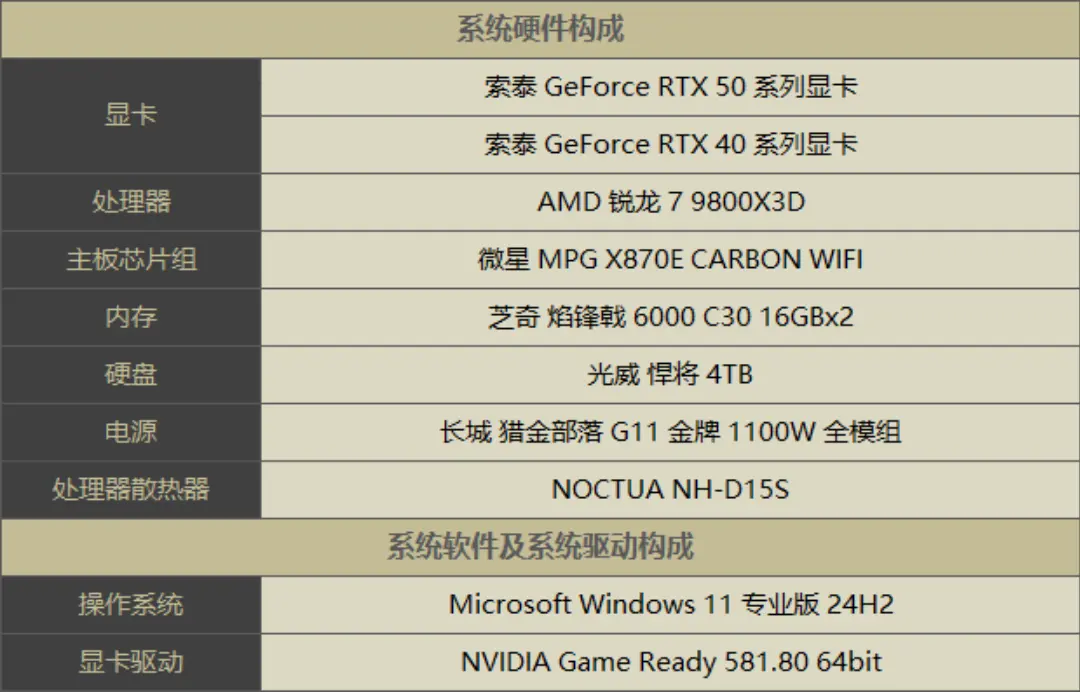
To make sure the GPUs — not the CPU or memory — were the main limiting factor, we built the test system around a very high-end gaming platform:
- CPU: AMD Ryzen 7 9800X3D
- Memory: 2 × 16 GB G.SKILL kit, tuned to 6000 MT/s CL30 on the AMD platform
- GPUs: Multiple RTX 50-series cards plus three representative mid-to-high-end RTX 40-series cards
- Vendor: All tested GPUs were supplied by ZOTAC
Other system details have minor impact on the overall performance picture and are not the focus here. The idea is straightforward: pair strong GPUs with a modern CPU and fast RAM so that frame rates reflect GPU capability as much as possible.
Because Shadow of the Erdtree does not include a built-in benchmark mode, we used a fixed manual route inside the DLC: running between the Graveyard Plain and the Flame-Kissed Ruins. We captured frame times with CapFrameX, always testing at midday, in clear weather, and avoiding combat as much as possible to keep the load consistent between runs.
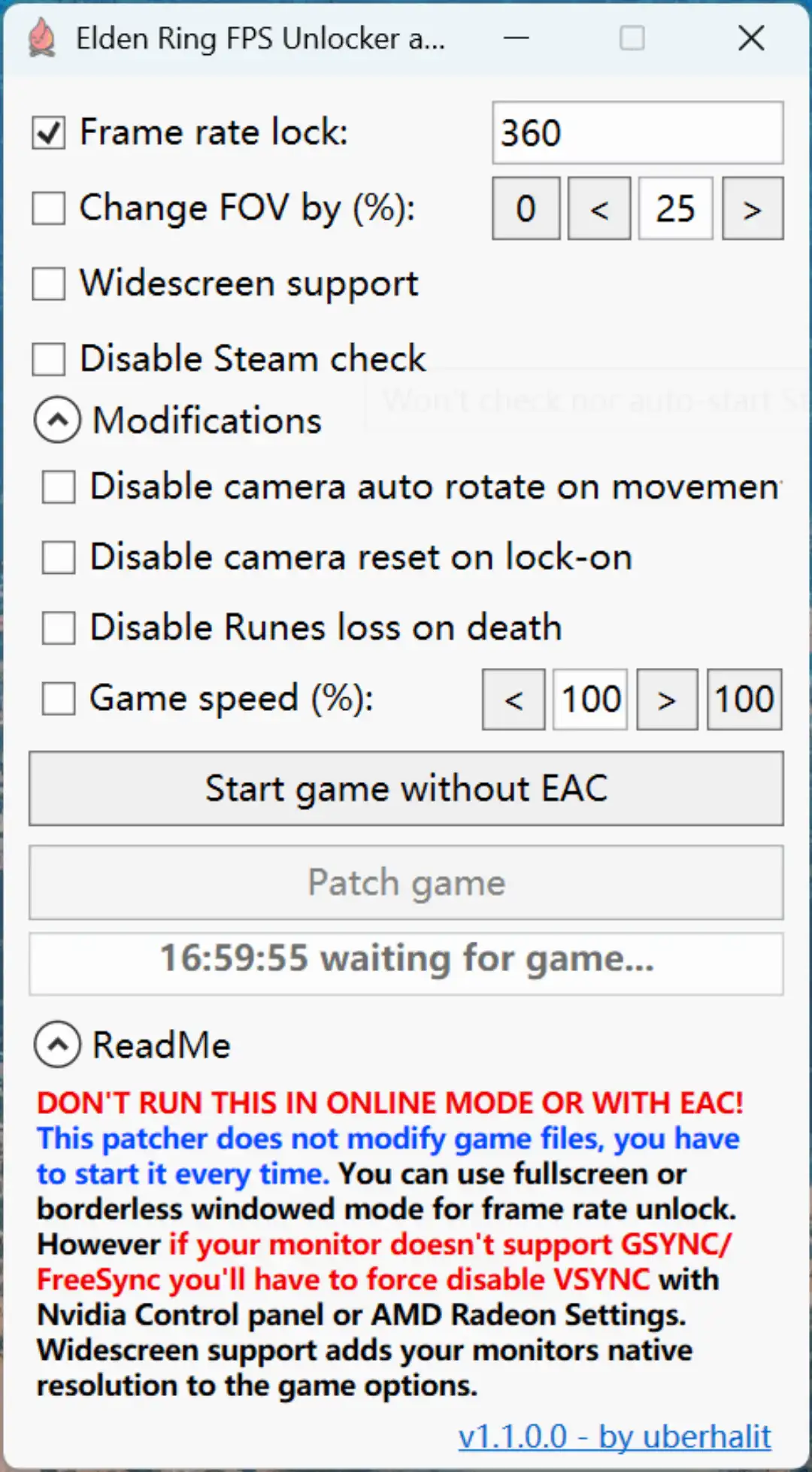
One important technical note: FromSoftware’s engine for Elden Ring, including Shadow of the Erdtree, ships with a 60 FPS cap by default. That cap makes it hard to show the difference between very strong GPUs in a normal playthrough. For benchmarking purposes only, we used a third-party tool called EldenRingFPSUnlockAndMore_v1.1.0.0 to remove the frame cap.
Unlocking FPS has consequences:
- The game’s anti-cheat system does not start, so all tests were run strictly offline.
- The engine is not truly optimized for high frame rates, so we saw noticeable stutter and frame-time spikes even on powerful hardware.
- We also observed a practical ceiling around 180 FPS, which appears to act as a hidden upper limit.
For this reason, these unlocked numbers are best seen as a way to compare GPUs. They are not a recommendation for how you should actually play the game every day.
4K Results: When the RTX 50 Series Finally Gets a Workout
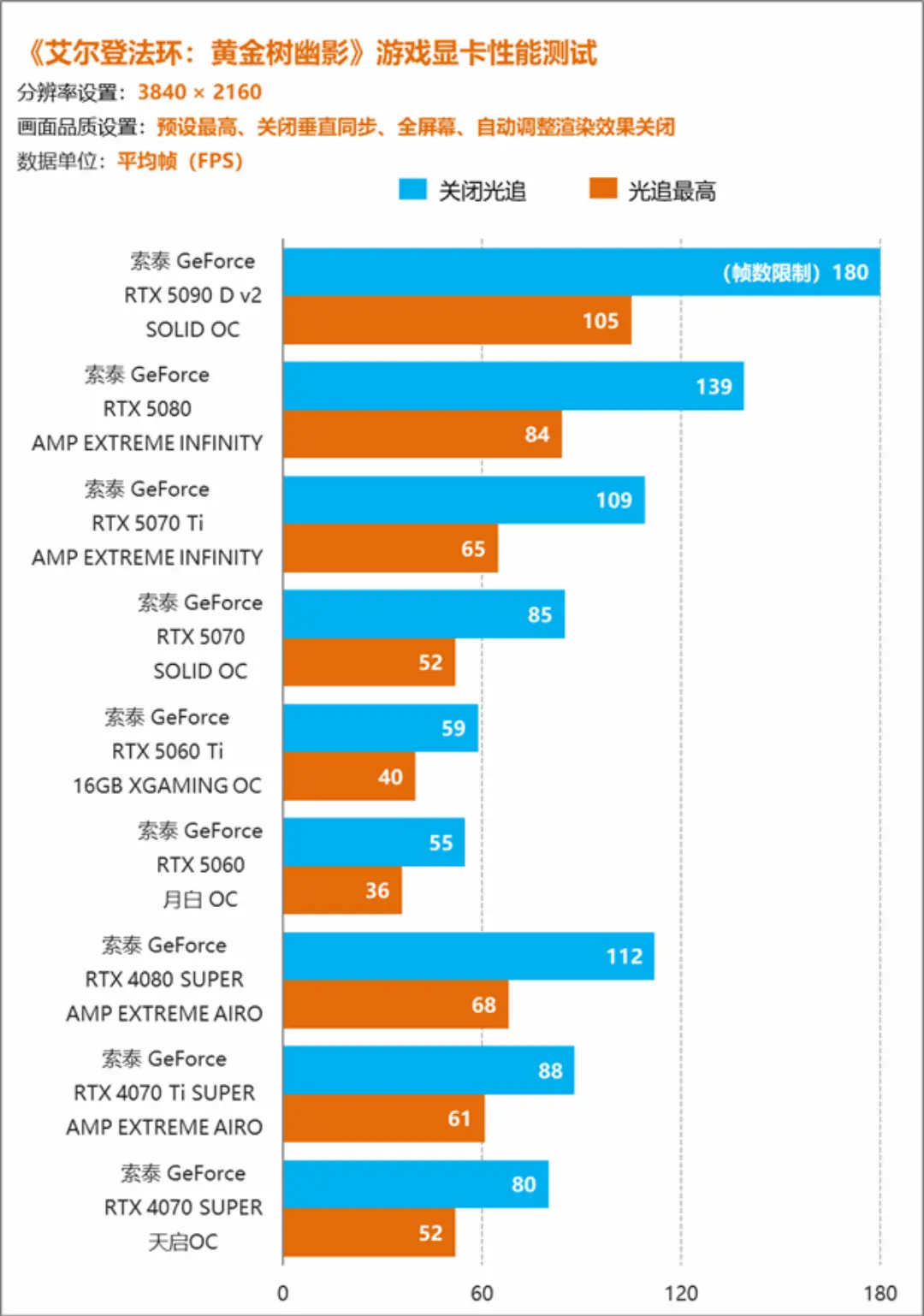
At native 4K, max settings, and the highest ray tracing preset, Shadow of the Erdtree still puts real pressure on current hardware. However, in our test run, the RTX 50-series cards showed clearly that they can handle it.
The flagship RTX 5090 D v2 delivered an average frame rate around 105 FPS in our 4K test run with ray tracing enabled. That is a huge margin above the original 60 FPS design target for Elden Ring and leaves plenty of headroom for the occasional frame-time spike or busy scene.
The RTX 5080 turned in two useful data points:
- With ray tracing off, we measured roughly 139 FPS on our path.
- With ray tracing set to the highest preset, it averaged about 84 FPS.
The RTX 5070 Ti lands just behind it, hovering around 109 FPS without ray tracing and roughly 65 FPS with ray tracing maxed. That puts it in a comfortable “playable” zone in both modes, though the 5080 obviously offers a nicer buffer at 4K with everything cranked.
Things look different for the more affordable RTX 5060 Ti and RTX 5060. At 4K with ray tracing on, they sit in the neighborhood of 40 FPS on average: technically “it runs,” but not what most players would call smooth. Turn off ray tracing, however, and their frame rates climb closer to the 60 FPS range, which is absolutely fine given that Elden Ring is fundamentally a 60 FPS-targeted game.
If you want a concrete 4K recommendation based on these results, the ZOTAC GeForce RTX 5080 16GB Apocalypse OC is the sweet spot in this test: it strikes a practical balance between price and the ability to push 4K with ray tracing while still keeping frame rates comfortably high.
1440p Results: The Real-World Sweet Spot
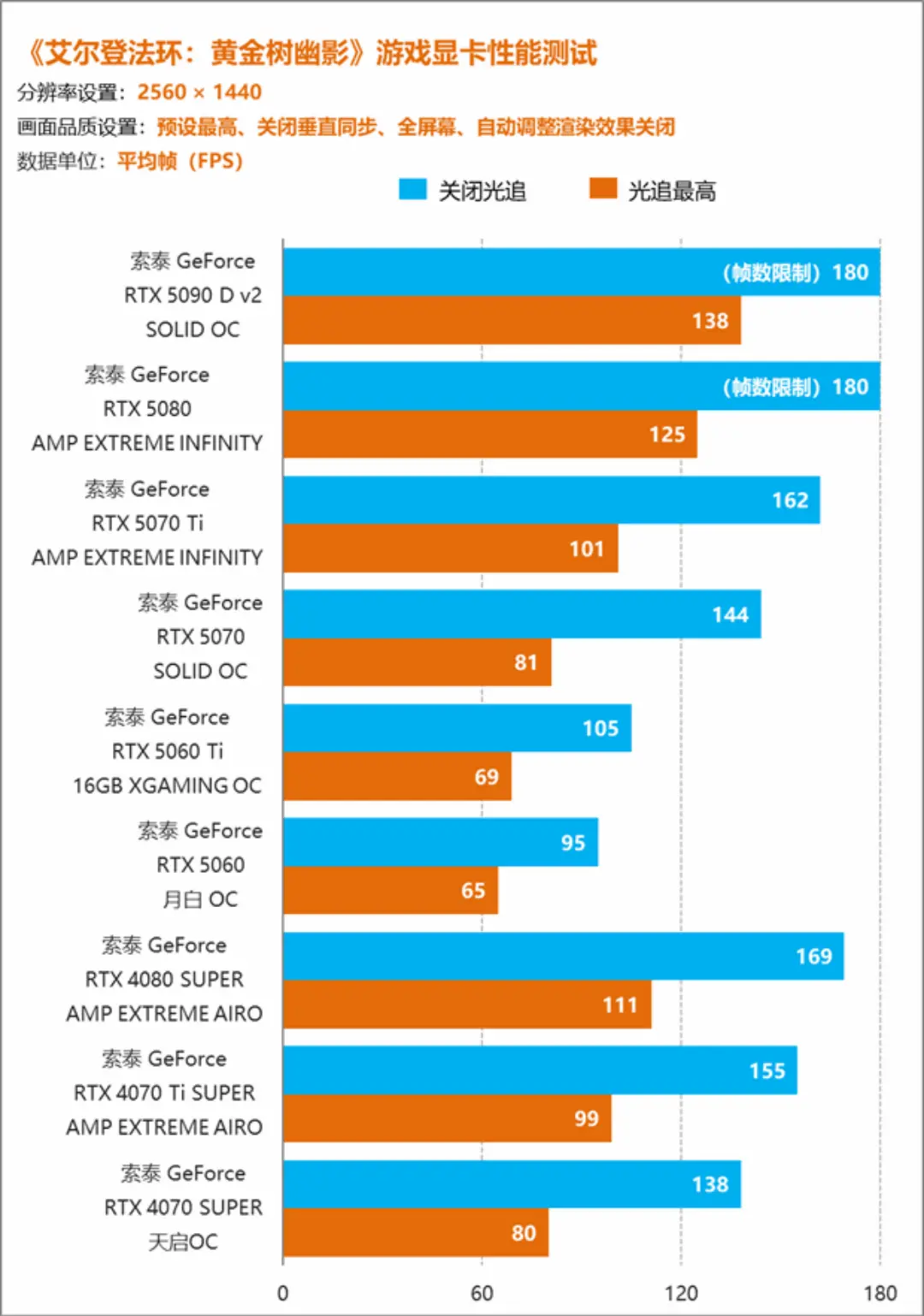
Moving down to 2K (1440p), we hit the “no stress” zone for the entire RTX 50-series lineup. In our test route through Shadow of the Erdtree, every 50-series card we tried had enough performance to treat 1440p as an almost casual workload.
Even the entry-level RTX 5060 delivered roughly 65 FPS with ray tracing fully enabled at 1440p. That means you can enjoy the DLC with upgraded lighting and shadows while still clearing the 60 FPS threshold that FromSoftware originally targeted.
Higher-end 50-series parts simply slam against the game’s practical limits. With ray tracing off, both the RTX 5090 D v2 and RTX 5080 ran into the approximately 180 FPS cap during our tests, which makes it hard to separate their true peak performance inside this engine. Turn ray tracing back on, and the difference between them shrinks to about a 10 FPS gap in our scene — measurable on charts, but not game-changing in actual play.
The takeaway: at 1440p, you do not need to obsess over tiny FPS gaps between high-end 50-series GPUs. If you are targeting a clean 60 FPS lock with excellent image quality, the entire family can deliver it. A strong, balanced choice for this resolution from our test is the ZOTAC GeForce RTX 5070 Ti 16GB XGAMING OC, which “overkills” 1440p without venturing into the flagship price tier.
1080p Results: When the Engine Becomes the Bottleneck
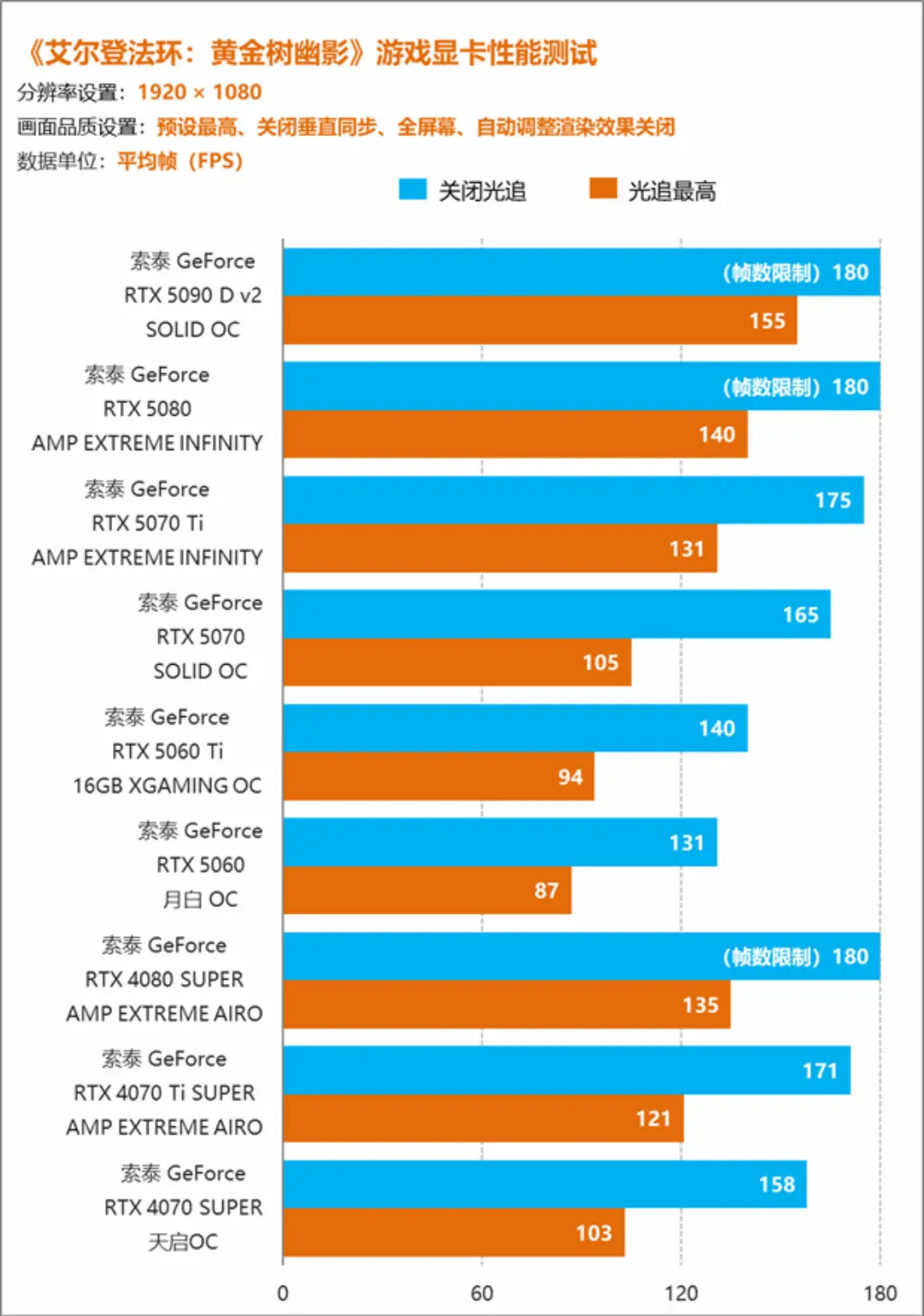
At 1080p, the story changes again. All of the GPUs we tested, from high-end to mid-range, end up in “performance surplus” territory. Yes, you can still plot charts and see that faster cards are faster, but in normal play those differences do not really matter once you remember that Elden Ring’s systems are still built around 60 FPS.
In this resolution, our unlocked benchmarks mostly highlight the engine’s high-FPS behavior rather than meaningful gameplay differences. Frame-time spikes, uneven pacing, and the hidden cap around 180 FPS all become more visible as GPU headroom increases, which can make charts look wild even when the game still feels broadly smooth.
For real-world 1080p play, we do not recommend chasing triple-digit frame rates by unlocking everything. A locked 60 FPS experience — with clean frame-times and consistent input response — is more valuable in this particular title.
If you are building a 1080p-focused Elden Ring machine, an affordable card such as the ZOTAC GeForce RTX 5060 Ti 16GB Star OC is already more than sufficient in this DLC, especially when paired with reasonable settings and the default 60 FPS cap.
Why We Still Recommend 60 FPS Lock + AI Frame Generation
FromSoftware’s games have a long-standing quirk: a lot of core combat logic is effectively tied to a 60 FPS baseline. Dodge i-frames, block timings, and guard-counter windows are all tuned with that frame rate in mind. If you simply crank the frame rate far beyond 60 FPS without adjusting how those timings are calculated, the effective windows can shrink, and the “feel” of the game changes in ways that are hard to predict.
Our unlocked testing for Shadow of the Erdtree confirmed a second problem: the DLC simply is not deeply optimized for very high frame rates. Even when the GPU has plenty of horsepower left, we still saw visible stutter and a hard ceiling around 180 FPS. In other words, the engine fights back once you push it beyond what it was really built to do.
That is why we see FPS unlock as a benchmarking tool, not a long-term gameplay setting. For actual day-to-day play, a more balanced strategy looks like this:
- Keep the game’s logic anchored at 60 FPS to preserve intended timings.
- Use GPU power to stabilize that 60 FPS under heavy loads and richer settings (for example, ray tracing where it makes sense).
- If you want a smoother perceived motion on a high-refresh display, enable AI frame generation in the NVIDIA app. In this mode, the real engine frame rate remains tied to 60 FPS, while AI-generated frames improve motion without rewriting the underlying combat logic.
In 2025, high-refresh monitors are everywhere, and 60 FPS can feel “old-school” on paper. But for a game whose systems were built around that target, using AI interpolation on top of a rock-solid 60 FPS base is a safer and more consistent path than trying to brute-force a fundamentally different frame-rate regime.
Common Myths About GPUs and Shadow of the Erdtree
A few myths tend to show up whenever people talk about this DLC and new GPU generations:
- Myth 1: “You need the absolute top-end RTX 50-series card to enjoy the DLC.”
Our tests show that while the RTX 5090 D v2 is a monster, you can have an excellent experience at 4K and 1440p on more modest 50-series GPUs if you choose settings wisely — especially at 1440p. - Myth 2: “High frame rates always make this game better.”
Because Elden Ring’s logic is tuned around 60 FPS, simply pushing frame rates far above that can introduce stutter and alter timing. Stability and clean frame-times at 60 FPS are more important here than chasing every last FPS for its own sake. - Myth 3: “Old games do not benefit from new GPUs.”
Shadow of the Erdtree may be built on a 2022 title, but its large environments and heavy graphics settings still benefit from stronger GPUs — especially at 4K with ray tracing. New hardware does not rewrite the engine, but it does make higher-end settings more accessible.
Frequently Asked Questions
1. Is the RTX 5060 enough for Shadow of the Erdtree?
Based on this test, an RTX 5060 can handle the DLC at 1440p with ray tracing on around the mid-60 FPS mark in our scenario, and it can reach around 60 FPS at 4K if you disable ray tracing. For many players, that is more than adequate, especially if you keep the game locked at 60 FPS and focus on stability.
2. Which RTX 50-series card is the best match for 4K?
If you want 4K with ray tracing and a comfortable FPS buffer, the RTX 5080 stood out in our tests as a strong balance of performance and practicality. The RTX 5090 D v2 is even faster, but the RTX 5080’s combination of roughly 84 FPS at 4K with ray tracing and much higher numbers with it off makes it an especially attractive choice.
3. Should I permanently use an FPS unlock mod when playing?
For benchmarking and curiosity, an FPS unlock tool can be useful — as long as you stay offline and accept the risk of stutter and timing quirks. For everyday play, we do not recommend it. Keeping the game at 60 FPS and optionally using NVIDIA’s AI frame generation for smoother motion is a safer way to enjoy Shadow of the Erdtree without unintended side effects on gameplay mechanics.
Sources, References & Fact-Check Notes
All performance numbers in this article come from the specific hardware configuration and test method described above: a Ryzen 7 9800X3D-based system with ZOTAC RTX 50-series and selected RTX 40-series GPUs, running a repeatable route between the Graveyard Plain and Flame-Kissed Ruins in Elden Ring: Shadow of the Erdtree, with CapFrameX used for capture and EldenRingFPSUnlockAndMore_v1.1.0.0 used only for temporary FPS unlocking in offline mode.
Results will vary on different systems, with different drivers, patches, and in different in-game areas. This article does not claim to represent official benchmarks from the game developer or GPU vendor and does not invent numbers beyond those observed in the stated test scenario.
Important Disclaimer
This article is for general informational and entertainment purposes only. It is not official guidance from any game studio, GPU manufacturer, or hardware vendor. Hardware purchases and system builds should take into account your own budget, local prices, and use cases. Always follow the game’s terms of service and security recommendations when using third-party tools, and run FPS unlock utilities only in offline mode at your own risk.
Final Thoughts: 4K Ready, 2K Dominant, 1080p Overkill
In our Elden Ring: Shadow of the Erdtree benchmarks, NVIDIA’s RTX 50-series cards proved that they can muscle this DLC into submission. At 4K with ray tracing, the top-end models offer triple-digit frame rates; at 1440p, the entire lineup feels almost casual; and at 1080p, the conversation shifts from “Can my GPU handle it?” to “What does the engine actually want?”
Shadow of the Erdtree still carries the technical quirks that FromSoftware games are known for, but newer hardware clearly changes what is possible. If you pair a sensible 60 FPS lock with the right GPU and, optionally, AI frame generation from the NVIDIA app, you can enjoy a smooth, visually rich journey through the Shadow Realm without turning every boss fight into a frame-time science project.